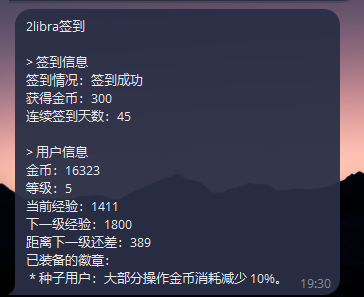
本站签到脚本分享,祝您早日拿到全勤勋章

分享本站签到脚本,使用方法,登录本站,然后 F12 打开调试工具,点击到网络,然后刷新一下,找到和本站有关的条目,找到cookie字段,复制cookie中的access_token= 后的字段。
粘贴到脚本中的HEADERS的 Cookie 的access_token=后保存。

填写推送的方式,我用的企微,把企微的 key 填入WECHAT_WEBHOOK中。放到 Linux 服务器写个定时运行就行,或者放到青龙中,写个定时任务运行。
祝大家早日拿到全勤徽章
复制
---
    import requests
    import time
    import json


    # -------------------------- 配置参数(需修改) --------------------------
    # 1. 签到目标 URL(用户提供的地址)
    SIGN_URL = "https://2libra.com/api/sign"

    # 2. 请求头(模拟浏览器访问,避免被反爬拦截)
    HEADERS = {
        "User-Agent": "Mozilla/5.0 (Macintosh; Intel Mac OS X 10_15_7) AppleWebKit/537.36 (KHTML, like Gecko) Chrome/137.0.0.0 Safari/537.36",
        "Accept": "*/*",
        "Host": "2libra.com",
        "Accept-Language": "zh-CN,zh;q=0.9",
        "Connection": "keep-alive",
        "Cookie": "access_token="
    }

    # 3. 企业微信机器人 Webhook(替换为你的机器人 key)
    WECHAT_WEBHOOK = "https://qyapi.weixin.qq.com/cgi-bin/webhook/send?key="

    # 4. 需检测的系统提醒字符串(用户提供的标记)
    SYSTEM_REMINDER = "签到成功"


    # -------------------------- 核心逻辑:签到请求与结果判断 --------------------------
    def check_signin_result():
        try:
            start_time = time.time()
            # 发送 GET 请求(签到通常是 GET 请求,若实际为 POST 可改为 requests.post)
            response = requests.post(
                url=SIGN_URL,
                headers=HEADERS,
                timeout=15 # 15 秒超时保护
            )
            time_cost = round(time.time() - start_time, 2) # 耗时(秒)

            # 初始化结果字典(默认失败)
            result = {
                "签到状态": "失败",
                "HTTP 状态码": response.status_code,
                "耗时(秒)": time_cost,
                "响应内容摘要": response.text[:300] # 截取前 300 字符,避免过长
            }

            # 步骤 1:检查 HTTP 状态码是否为 201(非 201 直接判定请求失败)
            if response.status_code != 201:
                result["失败原因"] = f"请求未成功(HTTP 状态码:{response.status_code})"
                return result

            # 步骤 2:检查响应内容中是否包含系统提醒字符串
            if SYSTEM_REMINDER in response.text:
                result["签到状态"] = "成功"
                result["成功原因"] = "检测到系统提醒,签到请求正常"
            else:
                result["失败原因"] = "响应内容中未找到系统提醒标记"

            return result

        except requests.exceptions.RequestException as e:
            # 捕获请求异常(网络错误、超时等)
            return {
                "签到状态": "失败",
                "失败原因": f"请求发送异常:{str(e)}",
                "耗时(秒)": round(time.time() - start_time, 2) if 'start_time' in locals() else "N/A"
            }


    # -------------------------- 企业微信机器人推送 --------------------------
    def send_wechat_notify(content):
        """发送消息到企业微信机器人"""
        try:
            # 构造企业微信消息格式(text 类型)
            payload = {
                "msgtype": "text",
                "text": {
                    "content": content,
                    "mentioned_list": ["@all"] # 可选:@所有人(不需要可删除此行)
                }
            }
            # 发送 POST 请求到 Webhook
            requests.post(
                url=WECHAT_WEBHOOK,
                headers={"Content-Type": "application/json"},
                data=json.dumps(payload),
                timeout=10
            )
        except Exception as e:
            print(f"企业微信通知发送失败:{str(e)}")


    # -------------------------- 主函数:执行签到并推送结果 --------------------------
    if __name__ == "__main__":
        # 执行签到检查
        sign_result = check_signin_result()

        # 构造通知内容(按关键信息排序)
        notify_lines = ["【2Libra 签到结果通知】"]
        for key in ["签到状态", "成功原因", "失败原因", "HTTP 状态码", "耗时(秒)", "响应内容摘要"]:
            if key in sign_result:
                notify_lines.append(f"{key}:{sign_result[key]}")
        notify_content = "\n".join(notify_lines)

        # 打印结果并推送
        print(notify_content)
        send_wechat_notify(notify_content)















此风不可长,牛逼