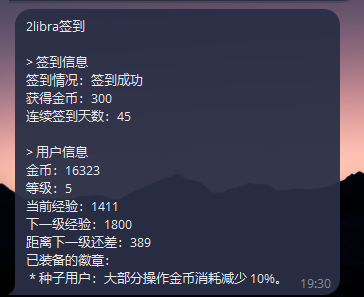
本站签到脚本分享,祝您早日拿到全勤勋章

46 条回复
423 次浏览

分享本站签到脚本,使用方法,登录本站,然后 F12 打开调试工具,点击到网络,然后刷新一下,找到和本站有关的条目,找到cookie字段,复制cookie中的access_token= 后的字段。

粘贴到脚本中的HEADERS的 Cookie 的access_token=后保存。
企业微信截图_cf9fb0ee-52d1-45ed-8213-639f9a71471e

填写推送的方式,我用的企微,把企微的 key 填入WECHAT_WEBHOOK中。放到 Linux 服务器写个定时运行就行,或者放到青龙中,写个定时任务运行。

祝大家早日拿到全勤徽章

复制
---
    import requests
    import time
    import json
        
        
    # -------------------------- 配置参数(需修改) --------------------------
    # 1. 签到目标 URL(用户提供的地址)
    SIGN_URL = "https://2libra.com/api/sign"
        
    # 2. 请求头(模拟浏览器访问,避免被反爬拦截)
    HEADERS = {
        "User-Agent": "Mozilla/5.0 (Macintosh; Intel Mac OS X 10_15_7) AppleWebKit/537.36 (KHTML, like Gecko) Chrome/137.0.0.0 Safari/537.36",
        "Accept": "*/*",
        "Host": "2libra.com",
        "Accept-Language": "zh-CN,zh;q=0.9",
        "Connection": "keep-alive",
        "Cookie": "access_token="
    }
        
    # 3. 企业微信机器人 Webhook(替换为你的机器人 key)
    WECHAT_WEBHOOK = "https://qyapi.weixin.qq.com/cgi-bin/webhook/send?key="
        
    # 4. 需检测的系统提醒字符串(用户提供的标记)
    SYSTEM_REMINDER = "签到成功"
        
        
    # -------------------------- 核心逻辑:签到请求与结果判断 --------------------------
    def check_signin_result():
        try:
            start_time = time.time()
            # 发送 GET 请求(签到通常是 GET 请求,若实际为 POST 可改为 requests.post)
            response = requests.post(
                url=SIGN_URL,
                headers=HEADERS,
                timeout=15 # 15 秒超时保护
            )
            time_cost = round(time.time() - start_time, 2) # 耗时(秒)
        
            # 初始化结果字典(默认失败)
            result = {
                "签到状态": "失败",
                "HTTP 状态码": response.status_code,
                "耗时(秒)": time_cost,
                "响应内容摘要": response.text[:300] # 截取前 300 字符,避免过长
            }
        
            # 步骤 1:检查 HTTP 状态码是否为 201(非 201 直接判定请求失败)
            if response.status_code != 201:
                result["失败原因"] = f"请求未成功(HTTP 状态码:{response.status_code})"
                return result
        
            # 步骤 2:检查响应内容中是否包含系统提醒字符串
            if SYSTEM_REMINDER in response.text:
                result["签到状态"] = "成功"
                result["成功原因"] = "检测到系统提醒,签到请求正常"
            else:
                result["失败原因"] = "响应内容中未找到系统提醒标记"
        
            return result
        
        except requests.exceptions.RequestException as e:
            # 捕获请求异常(网络错误、超时等)
            return {
                "签到状态": "失败",
                "失败原因": f"请求发送异常:{str(e)}",
                "耗时(秒)": round(time.time() - start_time, 2) if 'start_time' in locals() else "N/A"
            }
        
        
    # -------------------------- 企业微信机器人推送 --------------------------
    def send_wechat_notify(content):
        """发送消息到企业微信机器人"""
        try:
            # 构造企业微信消息格式(text 类型)
            payload = {
                "msgtype": "text",
                "text": {
                    "content": content,
                    "mentioned_list": ["@all"] # 可选:@所有人(不需要可删除此行)
                }
            }
            # 发送 POST 请求到 Webhook
            requests.post(
                url=WECHAT_WEBHOOK,
                headers={"Content-Type": "application/json"},
                data=json.dumps(payload),
                timeout=10
            )
        except Exception as e:
            print(f"企业微信通知发送失败:{str(e)}")
        
        
    # -------------------------- 主函数:执行签到并推送结果 --------------------------
    if __name__ == "__main__":
        # 执行签到检查
        sign_result = check_signin_result()
        
        # 构造通知内容(按关键信息排序)
        notify_lines = ["【2Libra 签到结果通知】"]
        for key in ["签到状态", "成功原因", "失败原因", "HTTP 状态码", "耗时(秒)", "响应内容摘要"]:
            if key in sign_result:
                notify_lines.append(f"{key}:{sign_result[key]}")
        notify_content = "\n".join(notify_lines)
        
        # 打印结果并推送
        print(notify_content)
        send_wechat_notify(notify_content)
❤️3
👍3
🔥1
1,160
种子用户
Admin

等你们脚本成熟了,我研究一下对抗自动签到是不是很不错bad_smile

收藏家

哈哈哈 每天进来一下 就自动签到成功了 这样就蛮好的

种子用户
Admin

@bopomofo @happystudy 没关系,会技术的一般都会抓包自动签到,而且现在签到也是很便捷,因此暂时没打算做限制,所以分享分析一些脚本其实没什么关系。

I'm rich
Guardian

好吧,其实我也早就开了,主要是防止周末断签,只是怕不允许我就没分享出来了 force_smile:

I'm rich
Guardian

@happystudy image

复制
{
  "name": "AutoSign",
  "nodes": [
    {
      "parameters": {
        "rule": {
          "interval": [
            {
              "field": "cronExpression",
              "expression": "0 12 * * *"
            }
          ]
        }
      },
      "type": "n8n-nodes-base.scheduleTrigger",
      "typeVersion": 1.3,
      "position": [
        0,
        0
      ],
      "id": "93be3f15-aec1-4c81-946a-483f15ddcaeb",
      "name": "Schedule Trigger"
    },
    {
      "parameters": {
        "conditions": {
          "options": {
            "caseSensitive": true,
            "leftValue": "",
            "typeValidation": "strict",
            "version": 3
          },
          "conditions": [
            {
              "id": "585657fe-2f55-41cd-a8e2-b53ff69a99e4",
              "leftValue": "={{ $json.d.signed }}",
              "rightValue": "",
              "operator": {
                "type": "boolean",
                "operation": "true",
                "singleValue": true
              }
            }
          ],
          "combinator": "and"
        },
        "options": {}
      },
      "type": "n8n-nodes-base.if",
      "typeVersion": 2.3,
      "position": [
        672,
        0
      ],
      "id": "6d289b86-13a2-49c0-87d6-5bcfacd45fdf",
      "name": "If"
    },
    {
      "parameters": {
        "workflowId": {
          "__rl": true,
          "value": "LSHkip9LCfPekhwO",
          "mode": "list",
          "cachedResultUrl": "/workflow/LSHkip9LCfPekhwO",
          "cachedResultName": "Token Manage"
        },
        "workflowInputs": {
          "mappingMode": "defineBelow",
          "value": {
            "username": "[email protected]"
          },
          "matchingColumns": [
            "username"
          ],
          "schema": [
            {
              "id": "username",
              "displayName": "username",
              "required": false,
              "defaultMatch": false,
              "display": true,
              "canBeUsedToMatch": true,
              "type": "string",
              "removed": false
            }
          ],
          "attemptToConvertTypes": false,
          "convertFieldsToString": true
        },
        "options": {}
      },
      "type": "n8n-nodes-base.executeWorkflow",
      "typeVersion": 1.3,
      "position": [
        224,
        0
      ],
      "id": "c9f04b1b-1877-464b-9f88-4c52b226345b",
      "name": "获取 token"
    },
    {
      "parameters": {
        "url": "https://2libra.com/api/sign/today",
        "sendHeaders": true,
        "headerParameters": {
          "parameters": [
            {
              "name": "authorization",
              "value": "=Bearer {{ $json.accessToken }}"
            }
          ]
        },
        "options": {}
      },
      "type": "n8n-nodes-base.httpRequest",
      "typeVersion": 4.3,
      "position": [
        448,
        0
      ],
      "id": "3ef03e4a-0490-4652-9bc7-1fdd37b63a3b",
      "name": "查询是否已签到"
    },
    {
      "parameters": {
        "method": "POST",
        "url": "https://2libra.com/api/sign",
        "sendHeaders": true,
        "headerParameters": {
          "parameters": [
            {
              "name": "authorization",
              "value": "=Bearer {{ $('获取 token').item.json.accessToken }}"
            }
          ]
        },
        "options": {}
      },
      "type": "n8n-nodes-base.httpRequest",
      "typeVersion": 4.3,
      "position": [
        896,
        16
      ],
      "id": "960f0d2e-2899-4052-b78b-8bbc438681e9",
      "name": "签到"
    }
  ],
  "pinData": {},
  "connections": {
    "Schedule Trigger": {
      "main": [
        [
          {
            "node": "获取 token",
            "type": "main",
            "index": 0
          }
        ]
      ]
    },
    "If": {
      "main": [
        [],
        [
          {
            "node": "签到",
            "type": "main",
            "index": 0
          }
        ]
      ]
    },
    "获取 token": {
      "main": [
        [
          {
            "node": "查询是否已签到",
            "type": "main",
            "index": 0
          }
        ]
      ]
    },
    "查询是否已签到": {
      "main": [
        [
          {
            "node": "If",
            "type": "main",
            "index": 0
          }
        ]
      ]
    }
  },
  "active": true,
  "settings": {
    "executionOrder": "v1",
    "timeSavedMode": "fixed",
    "timezone": "Asia/Shanghai",
    "callerPolicy": "workflowsFromSameOwner",
    "availableInMCP": false
  },
  "versionId": "cdabb29b-aeab-4c73-94b8-ff2069a40294",
  "meta": {
    "instanceId": "51a59cab78b42ea991a9c76d02cdc457bc2410c93926a1506a3b1f4c19ac5864"
  },
  "id": "Koxwwo8tPZDq3kNK",
  "tags": []
}

导入 n8n 后,第二个节点你可以按照 op 的方式手动获取一下 token,我的那个工作流还没改完,所以就不给你了

种子用户
Guardian

爬虫会加大服务器压力,自动签到如果都是零点后或者统一的时间,会导致瞬时流量过大。现在访问就会签到,大家都这么玩,迟早要改成手动点击和验证码签到的,这些行为基本上都是浪费资源,一部分用户是真的签到活跃,后面人多了就会有人开小号签到,那些小号不产生内容,没有任何益处,就是纯占用资源。

种子用户
OP

脚本是对签到接口请求,而且我也没有写重签机制,服务器如果这点请求都处理不过来,那就没办法了

种子用户
Guardian

我说的人多的情况,现在人少,接口也不是天然就支持高并发,人多瞬时流量就可以打垮。瞬时进去就跟 CC 一样。

种子用户
Guardian

@path 接口不缓存,都是回源的,防御模式是宽松模式,主要是杜绝恶意行为,现在人少怎么玩都行,人多就会有各种养小号,刷币。

种子用户

dify 自动化 DSL,导入之后改一下 access_token,钉钉 webhook URL 和 secret 就行,可设置定时触发

复制
app:
  description: ''
  icon: 🤖
  icon_background: '#FFEAD5'
  mode: workflow
  name: 自动签到 2libra
  use_icon_as_answer_icon: false
dependencies:
- current_identifier: null
  type: marketplace
  value:
    marketplace_plugin_unique_identifier: langgenius/dingtalk:0.0.4@1a167a005bd3509142f45f7a771f887c75437ea367840dee9760782a1a1ef082
    version: null
kind: app
version: 0.5.0
workflow:
  conversation_variables: []
  environment_variables:
  - description: ''
    id: e93f714f-c7c3-495b-8232-c0976882f279
    name: access
    selector:
    - env
    - access
    value: xxx
    value_type: string
  features:
    file_upload:
      allowed_file_extensions:
      - .JPG
      - .JPEG
      - .PNG
      - .GIF
      - .WEBP
      - .SVG
      allowed_file_types:
      - image
      allowed_file_upload_methods:
      - local_file
      - remote_url
      enabled: false
      fileUploadConfig:
        attachment_image_file_size_limit: 2
        audio_file_size_limit: 50
        batch_count_limit: 5
        file_size_limit: 15
        file_upload_limit: 50
        image_file_batch_limit: 10
        image_file_size_limit: 10
        single_chunk_attachment_limit: 10
        video_file_size_limit: 100
        workflow_file_upload_limit: 10
      image:
        enabled: false
        number_limits: 3
        transfer_methods:
        - local_file
        - remote_url
      number_limits: 3
    opening_statement: ''
    retriever_resource:
      enabled: true
    sensitive_word_avoidance:
      enabled: false
    speech_to_text:
      enabled: false
    suggested_questions: []
    suggested_questions_after_answer:
      enabled: false
    text_to_speech:
      enabled: false
      language: ''
      voice: ''
  graph:
    edges:
    - data:
        isInIteration: false
        isInLoop: false
        sourceType: trigger-schedule
        targetType: code
      id: 1769494738391-source-1769494750570-target
      source: '1769494738391'
      sourceHandle: source
      target: '1769494750570'
      targetHandle: target
      type: custom
      zIndex: 0
    - data:
        isInIteration: false
        isInLoop: false
        sourceType: code
        targetType: tool
      id: 1769494750570-source-1769495132057-target
      source: '1769494750570'
      sourceHandle: source
      target: '1769495132057'
      targetHandle: target
      type: custom
      zIndex: 0
    - data:
        isInLoop: false
        sourceType: trigger-webhook
        targetType: code
      id: 1769495187553-source-1769494750570-target
      source: '1769495187553'
      sourceHandle: source
      target: '1769494750570'
      targetHandle: target
      type: custom
      zIndex: 0
    nodes:
    - data:
        config:
          frequency: daily
          mode: visual
          timezone: UTC
          visual_config:
            monthly_days:
            - 1
            on_minute: 0
            time: 12:00 AM
            weekdays:
            - sun
        cron_expression: ''
        frequency: daily
        mode: visual
        selected: false
        title: 定时触发器
        type: trigger-schedule
        visual_config:
          monthly_days:
          - 1
          on_minute: 0
          time: 12:00 AM
          weekdays:
          - sun
      height: 130
      id: '1769494738391'
      position:
        x: 64
        y: 282
      positionAbsolute:
        x: 64
        y: 282
      selected: false
      sourcePosition: right
      targetPosition: left
      type: custom
      width: 242
    - data:
        code: "import requests\nimport time\nimport json\n\n\n# --------------------------\
          \ 配置参数(需修改) --------------------------\n# 1. 签到目标 URL(用户提供的地址)\nSIGN_URL\
          \ = \"https://2libra.com/api/sign\"\n\n# 2. 请求头(模拟浏览器访问,避免被反爬拦截)\nHEADERS\
          \ = {\n \"User-Agent\": \"Mozilla/5.0 (Macintosh; Intel Mac OS X 10_15_7)\
          \ AppleWebKit/537.36 (KHTML, like Gecko) Chrome/137.0.0.0 Safari/537.36\"\
          ,\n \"Accept\": \"*/*\",\n \"Host\": \"2libra.com\",\n \"Accept-Language\"\
          : \"zh-CN,zh;q=0.9\",\n \"Connection\": \"keep-alive\"\n}\n\n# 4. 需检测的系统提醒字符串(用户提供的标记)\n\
          SYSTEM_REMINDER = \"签到成功\"\n\n\n# -------------------------- 核心逻辑:签到请求与结果判断\
          \ --------------------------\ndef check_signin_result(access_token):\n \
          \ try:\n start_time = time.time()\n # 动态构造 headers\n \
          \ headers = HEADERS.copy()\n headers[\"Cookie\"] = f\"access_token={access_token}\"\
          \n # 发送 GET 请求(签到通常是 GET 请求,若实际为 POST 可改为 requests.post)\n \
          \ response = requests.post(\n url=SIGN_URL,\n headers=headers,\n\
          \ timeout=15 # 15 秒超时保护\n )\n time_cost = round(time.time()\
          \ - start_time, 2) # 耗时(秒)\n\n # 初始化结果字典(默认失败)\n result =\
          \ {\n \"签到状态\": \"失败\",\n \"HTTP 状态码\": response.status_code,\n\
          \ \"耗时(秒)\": time_cost,\n \"响应内容摘要\": response.text[:300]\
          \ # 截取前 300 字符,避免过长\n }\n\n # 步骤 1:检查 HTTP 状态码是否为 201(非 201\
          \ 直接判定请求失败)\n if response.status_code != 201:\n result[\"\
          失败原因\"] = f\"请求未成功(HTTP 状态码:{response.status_code})\"\n return\
          \ result\n\n # 步骤 2:检查响应内容中是否包含系统提醒字符串\n if SYSTEM_REMINDER\
          \ in response.text:\n result[\"签到状态\"] = \"成功\"\n \
          \ result[\"成功原因\"] = \"检测到系统提醒,签到请求正常\"\n else:\n result[\"\
          失败原因\"] = \"响应内容中未找到系统提醒标记\"\n\n return result\n\n except requests.exceptions.RequestException\
          \ as e:\n # 捕获请求异常(网络错误、超时等)\n return {\n \"签到状态\"\
          : \"失败\",\n \"失败原因\": f\"请求发送异常:{str(e)}\",\n \"耗时(秒)\"\
          : round(time.time() - start_time, 2) if 'start_time' in locals() else \"\
          N/A\"\n }\n\n\ndef main(access_token:str):\n # 执行签到检查\n sign_result\
          \ = check_signin_result(access_token)\n\n # 构造通知内容(按关键信息排序)\n notify_lines\
          \ = [\"【2Libra 签到结果通知】\"]\n for key in [\"签到状态\", \"成功原因\", \"失败原因\"\
          , \"HTTP 状态码\", \"耗时(秒)\", \"响应内容摘要\"]:\n if key in sign_result:\n\
          \ notify_lines.append(f\"{key}:{sign_result[key]}\")\n notify_content\
          \ = \"\\n\".join(notify_lines)\n return {\n \"result\":notify_content\n\
          \ }\n"
        code_language: python3
        outputs:
          result:
            children: null
            type: string
        selected: false
        title: 代码执行
        type: code
        variables:
        - value_selector:
          - env
          - access
          value_type: string
          variable: access_token
      height: 52
      id: '1769494750570'
      position:
        x: 407
        y: 397
      positionAbsolute:
        x: 407
        y: 397
      selected: true
      sourcePosition: right
      targetPosition: left
      type: custom
      width: 242
    - data:
        is_team_authorization: true
        paramSchemas:
        - auto_generate: null
          default: null
          form: form
          human_description:
            en_US: access_token in the group robot webhook
            ja_JP: access_token in the group robot webhook
            pt_BR: access_token in the group robot webhook
            zh_Hans: 群自定义机器人 webhook 中 access_token 字段的值
          label:
            en_US: access token
            ja_JP: access token
            pt_BR: access token
            zh_Hans: access token
          llm_description: ''
          max: null
          min: null
          name: access_token
          options: []
          placeholder: null
          precision: null
          required: true
          scope: null
          template: null
          type: secret-input
        - auto_generate: null
          default: null
          form: form
          human_description:
            en_US: secret key for signing
            ja_JP: secret key for signing
            pt_BR: secret key for signing
            zh_Hans: 加签秘钥
          label:
            en_US: secret key for signing
            ja_JP: secret key for signing
            pt_BR: secret key for signing
            zh_Hans: 加签秘钥
          llm_description: ''
          max: null
          min: null
          name: sign_secret
          options: []
          placeholder: null
          precision: null
          required: true
          scope: null
          template: null
          type: secret-input
        - auto_generate: null
          default: null
          form: llm
          human_description:
            en_US: Content to sent to the group.
            ja_JP: Content to sent to the group.
            pt_BR: Content to sent to the group.
            zh_Hans: 群消息文本
          label:
            en_US: content
            ja_JP: content
            pt_BR: content
            zh_Hans: 消息内容
          llm_description: Content of the message
          max: null
          min: null
          name: content
          options: []
          placeholder: null
          precision: null
          required: true
          scope: null
          template: null
          type: string
        - auto_generate: null
          default: text
          form: form
          human_description:
            en_US: dingtalk Group bot message type
            ja_JP: dingtalk Group bot message type
            pt_BR: dingtalk Group bot message type
            zh_Hans: 群机器人 webhook 的消息类型
          label:
            en_US: dingtalk Group bot message type
            ja_JP: dingtalk Group bot message type
            pt_BR: dingtalk Group bot message type
            zh_Hans: 群机器人 webhook 的消息类型
          llm_description: ''
          max: null
          min: null
          name: message_type
          options:
          - icon: ''
            label:
              en_US: Text
              ja_JP: Text
              pt_BR: Text
              zh_Hans: 文本
            value: text
          - icon: ''
            label:
              en_US: Markdown
              ja_JP: Markdown
              pt_BR: Markdown
              zh_Hans: Markdown
            value: markdown
          placeholder: null
          precision: null
          required: true
          scope: null
          template: null
          type: select
        params:
          access_token: ''
          content: ''
          message_type: ''
          sign_secret: ''
        plugin_id: langgenius/dingtalk
        plugin_unique_identifier: langgenius/dingtalk:0.0.4@1a167a005bd3509142f45f7a771f887c75437ea367840dee9760782a1a1ef082
        provider_icon: https://cloud.dify.ai/console/api/workspaces/current/plugin/icon?tenant_id=971e6aae-4893-45a9-8339-8fd25efc4bbb&filename=a21f02d16b0be15978b070528f938f57674668be2965c6604ed644b66e4d857a.svg
        provider_id: langgenius/dingtalk/dingtalk
        provider_name: langgenius/dingtalk/dingtalk
        provider_type: builtin
        selected: false
        title: 发送群消息
        tool_configurations:
          access_token:
            type: mixed
            value: xxxx
          message_type:
            type: constant
            value: text
          sign_secret:
            type: mixed
            value: xxxxx
        tool_description: 通过钉钉的群机器人 webhook 发送群消息
        tool_label: 发送群消息
        tool_name: dingtalk_group_bot
        tool_node_version: '2'
        tool_parameters:
          content:
            type: mixed
            value: '{{#1769494750570.result#}}'
        type: tool
      height: 140
      id: '1769495132057'
      position:
        x: 740
        y: 397
      positionAbsolute:
        x: 740
        y: 397
      selected: false
      sourcePosition: right
      targetPosition: left
      type: custom
      width: 242
    - data:
        async_mode: true
        body: []
        content_type: application/json
        headers: []
        method: GET
        params: []
        response_body: ''
        selected: false
        status_code: 200
        title: Webhook 触发器
        type: trigger-webhook
        variables:
        - label: raw
          required: true
          value_selector: []
          value_type: object
          variable: _webhook_raw
        webhook_debug_url: ''
        webhook_url: ''
      height: 130
      id: '1769495187553'
      position:
        x: 64
        y: 429
      positionAbsolute:
        x: 64
        y: 429
      selected: false
      sourcePosition: right
      targetPosition: left
      type: custom
      width: 242
    viewport:
      x: 111
      y: 140.5
      zoom: 1
  rag_pipeline_variables: []

我是写到一半 发现没有什么意义,就是来灌水了,整的这样太累了

发表一个评论

R保持